
Your cart
There are no more items in your cart


B2B Module with VIES Validation & EU VAT Exemption for PrestaShop
Selected:
$274.99
What your customer sees
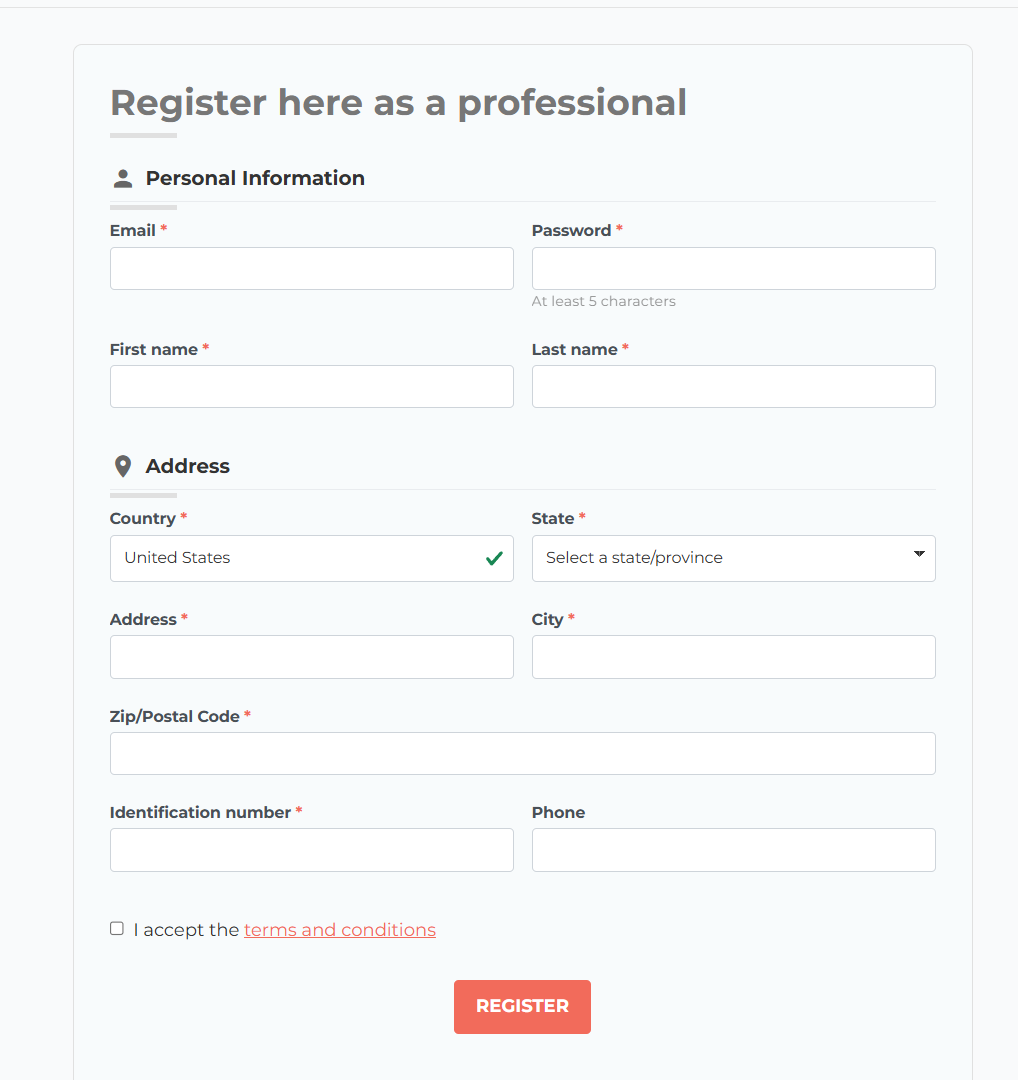
A sign-up page for businesses, apart from the consumer one, asking exactly what you need to know.
Your trade customers register through their own page, with its own address in every language and a button in the header and on the login screen. The form comes in three blocks —their details, their company and their billing address— and asks for the company name, the VAT number, the tax ID or SIRET, the phone number and anything you add. While they fill it in, the European VAT number is checked against VIES, and for non-EU countries the field can be hidden so nobody gets confused.
In your colours
Buttons, headings, fields and messages follow sixteen colour settings, so the form looks like part of your shop, whatever the theme.
Terms in plain sight
Terms and privacy policy are accepted with a checkbox and read in a pop-up window, without leaving the form.
No bot sign-ups
reCAPTCHA v2 or v3, or cookie-free ALTCHA if you have our anti-spam module, so only people get through.
A page Google can find
The sign-up page has its own friendly URL, title and description in every language, and you decide whether Google indexes it.
You decide who gets in
Every application lands in your inbox and is approved in one click.
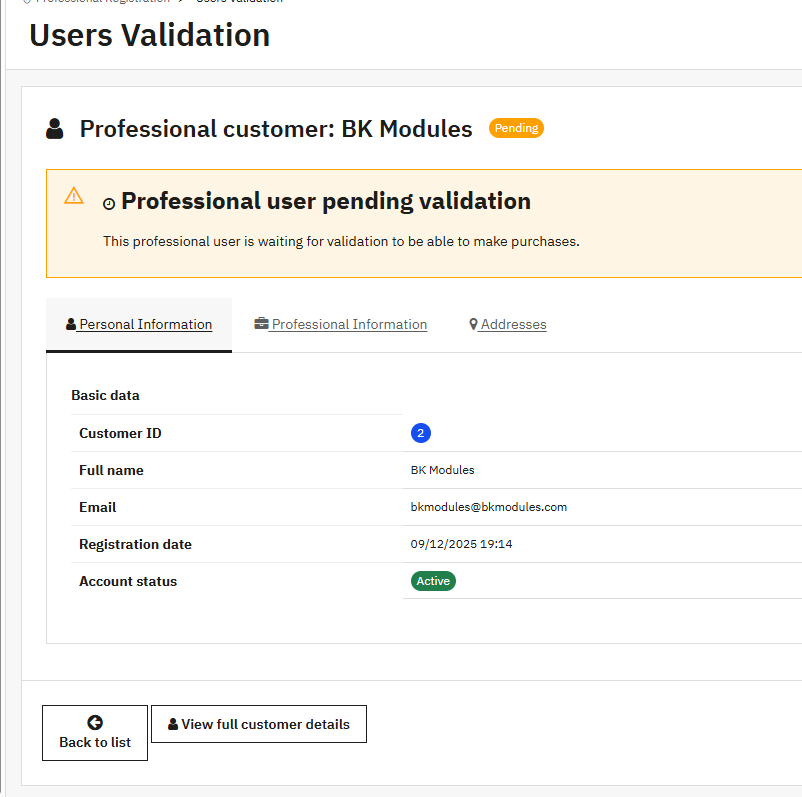
When a business signs up you get an email with all their details —and any documents they uploaded, attached— at one or several addresses. Their account waits until you review it: the validation list shows pending, approved or all accounts, with company, email and date.
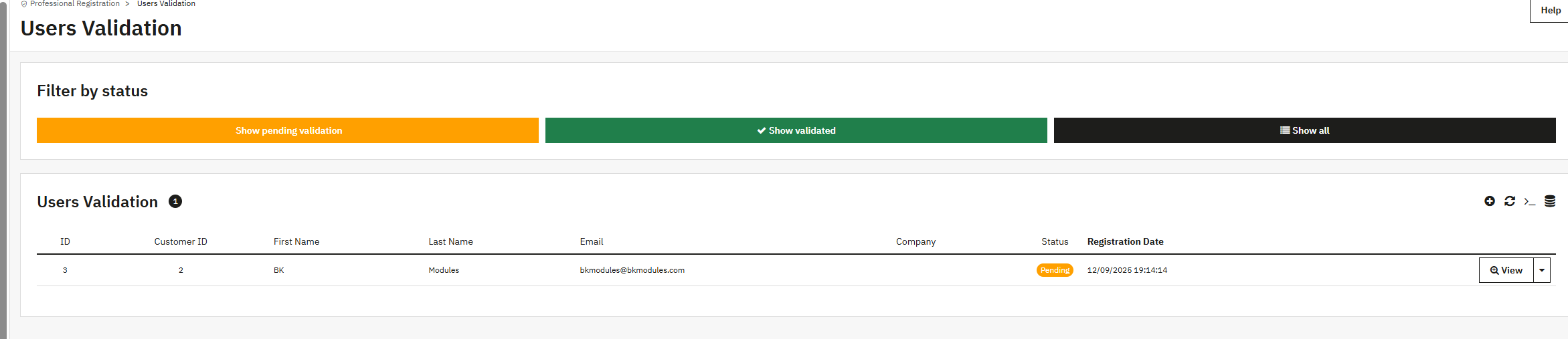
Open the application and it is all there, split into personal details, company details and addresses. Once you approve it, the account is activated, the customer joins the trade customer group you chose —with its PrestaShop group prices and discounts— and gets the welcome email. The PrestaShop customer page also shows whether they are a trade customer, whether they are approved and their groups, with the button to approve them right there.
Rather not review them one by one?
Turn on automatic approval and customers can buy straight away. If their VAT number fails the VIES check, that account is held as pending for you to look at.
VAT numbers checked in VIES
Applications reach you with the number already verified against the European register.
The module asks VIES, the European Commission's VAT number service, at the moment of registration. You choose which fields are checked —VAT number, tax ID, SIRET or APE— and what happens when a number fails: block the sign-up in strict mode, or let it through and log the result for you to decide. You can also stop two customers registering with the same number.
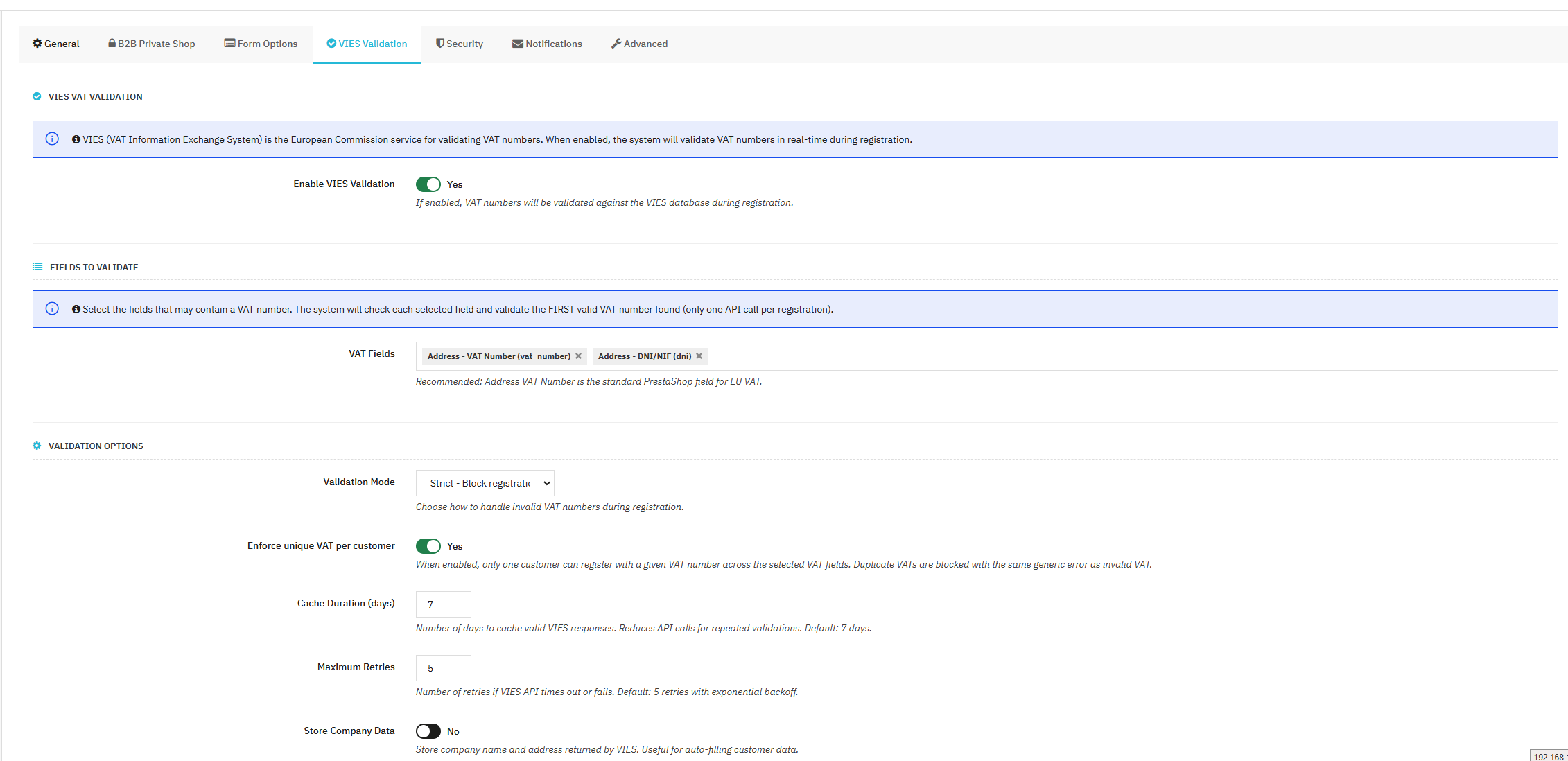
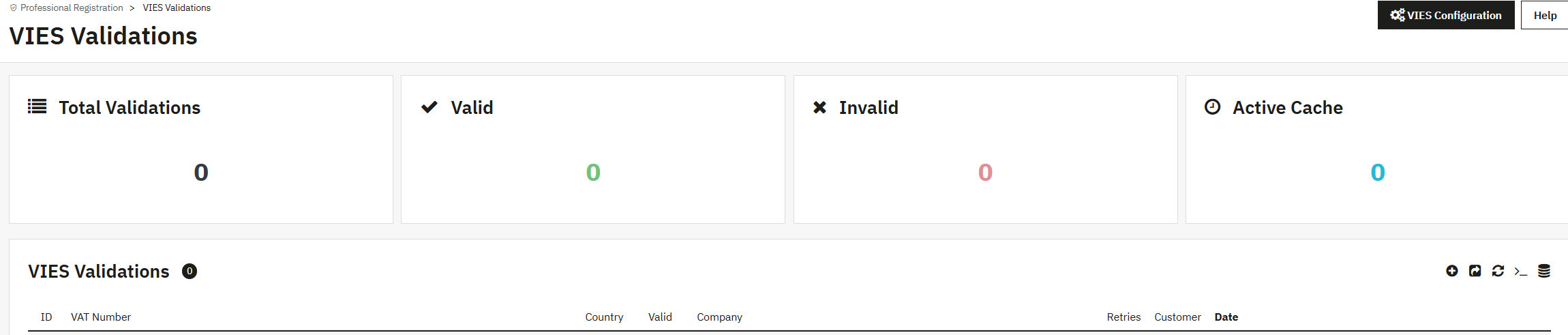
VIES doesn't always answer first time: each country runs its own register and some days it is overloaded. So the module retries up to five times, waiting a little longer each time, and keeps valid answers for 1 to 30 days so the same number isn't checked twice. Every check is logged with country, result, retries, customer and date, plus the name and address VIES holds for that company if you choose to store them.
And if the VAT number wasn't given at sign-up
You can leave it optional so registration stays quick, and ask for it later: if a trade customer reaches checkout without one, the billing step asks for that single field and won't move on until it is filled in, checked against VIES just like at sign-up.
Intra-EU sales without VAT
The VAT-free price appears only when the conditions are met.
Tell the module which country your business is in and it applies the intra-community VAT exemption to the customers entitled to it: businesses with a valid VIES number in another EU country. Customers in your own country and outside the EU keep your usual tax rules, with no extra groups or tax rules to set up.
What the European VAT number module did, and more
In PrestaShop 1.7 this was handled by the native European VAT number module. That module has been archived and PrestaShop 8 and 9 no longer ship it, so this module takes its place: it checks the number in VIES, removes VAT when it should and, on top of that, lets you approve each customer and close your catalogue.
A trade-only catalogue
The whole shop closes and you open only what you want.
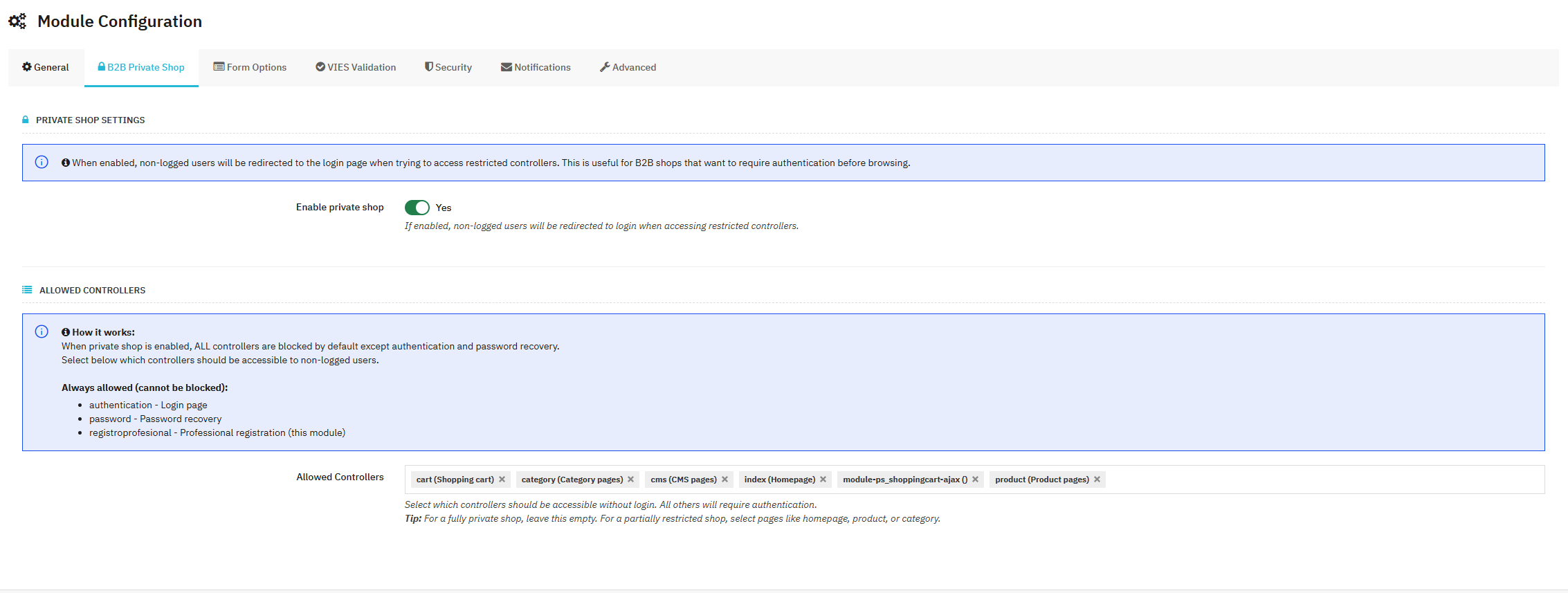
With private shop mode on, visitors who aren't logged in see no products, prices or categories: they are sent to the login screen and, once signed in, back to the page they wanted. You pick from a list which pages of your shop and of your modules stay open. Login, password recovery, trade registration and the error page are always open, so nobody is locked out without a way to sign up.
Closed wholesale
Leave nothing open: only your approved customers see the catalogue and the prices.
Open shop window
Keep the home page, categories and content pages open and close product pages and the cart: Google finds you, and to see the details people sign up.
Browse yes, buy no
Open everything except cart and checkout: anyone can browse the catalogue, only account holders can order.
Mixed B2B and B2C
Without private mode, consumers shop as usual and businesses register on their own form, with their approval and their group.
Your own sign-up form
Ask for what your business needs, not one field more.
Every field on the form can be shown or hidden and set as required or optional, and you reorder them by dragging. Personal details, company details —company, SIRET, website, additional information— and address details —tax ID, VAT number, phone, state— are set up separately.
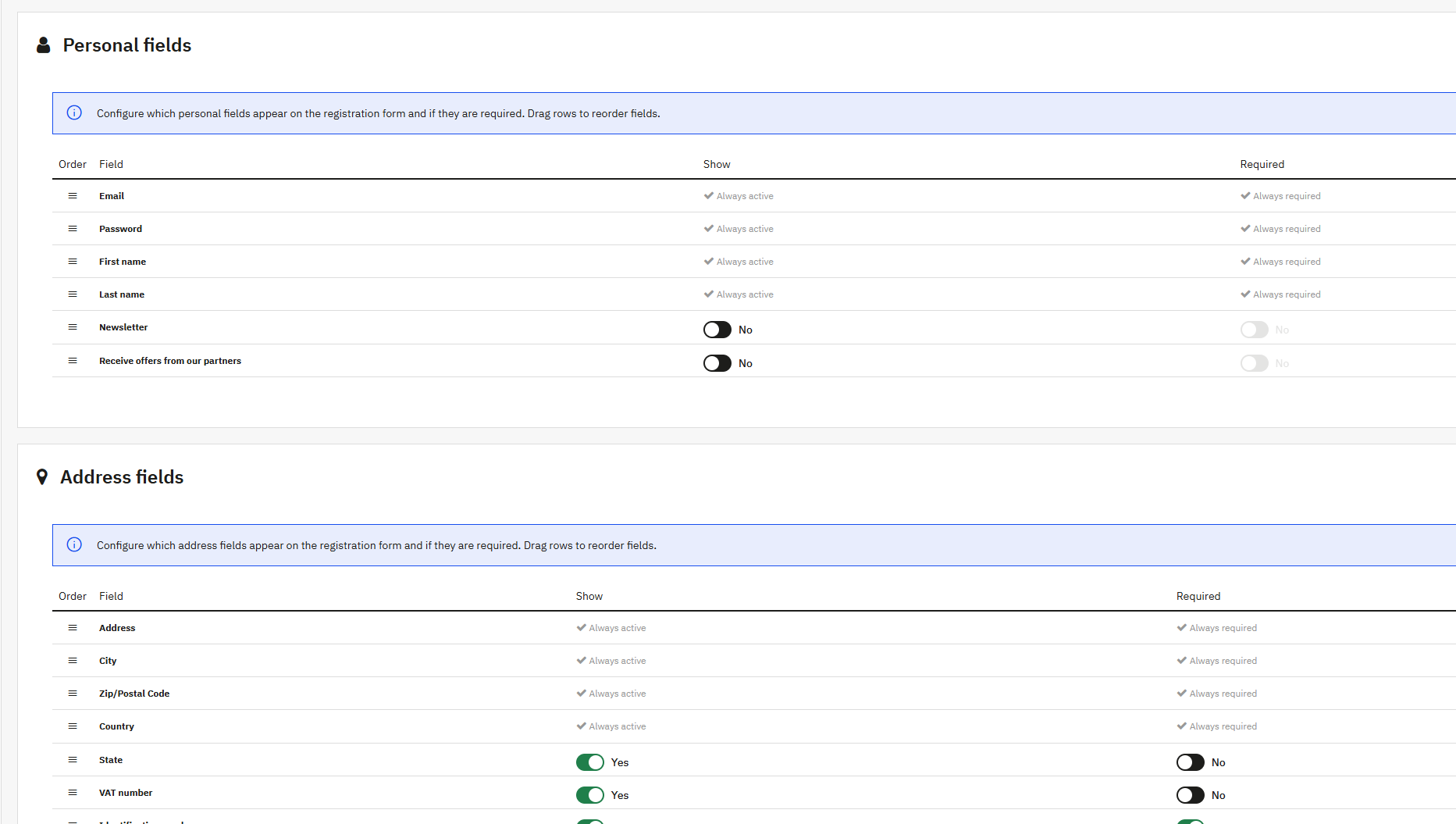
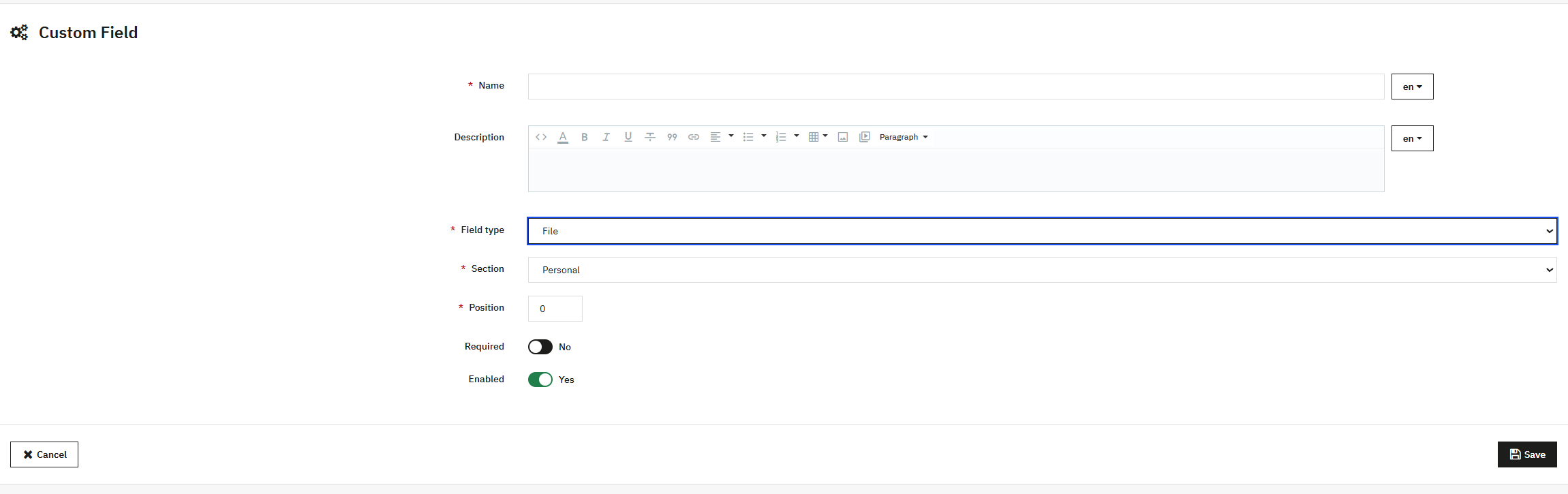
Need something else —a professional licence number, a trade certificate, their account code in your ERP? Create a text field with its own label and help text in every language. Or a file field, so they can upload the certificate or licence: it reaches you attached to the application email.
What PrestaShop leaves out
PrestaShop's B2B mode adds fields; it doesn't decide who can buy.
Turning on B2B mode gives the customer account company, SIRET, APE and website fields, and the back office credit and risk fields. But nobody checks the VAT number, anyone who registers can buy at your prices, the catalogue stays visible to everyone and intra-EU VAT isn't removed. This module adds those four pieces: VIES check, approval, private shop and VAT exemption.
We explain it without jargon in how to set up a B2B store in PrestaShop: closed catalogue, sign-up with VAT number and when you can invoice without VAT.
Is this your case?
If you sell to businesses, almost certainly.
Who it's for
- Wholesalers and distributors who sell to trade only.
- Manufacturers who don't want their prices in front of competitors.
- Shops selling to businesses in other EU countries and invoicing without VAT.
- Mixed shops that want separate sign-up and prices for businesses.
- Suppliers to licensed professionals who must check who is buying.
What changes in your day
- No more pasting numbers into the VIES website: applications arrive checked.
- Approving a customer takes fifteen seconds, not an email thread.
- Each trade customer's price comes from their group, never by hand.
- Intra-EU VAT comes out right in the cart and on the invoice.
Before you buy
What's worth knowing before you install it.
Your shop
- PrestaShop 1.7.8 onwards, 8.x and 9.x
- PHP 7.4 or later, with cURL to reach VIES
- Any theme: Classic, Warehouse or your own
- No overrides, no core changes
Languages and texts
- Translated into English, Spanish, French, Italian, German, Polish and Czech
- Titles, messages and email subjects editable in every language
- Debug log to follow every sign-up and every VIES check
- Lifetime licence with three months of updates and support
Frequently asked questions
Where is the European VAT number module in PrestaShop 8 and 9?
It's gone. The native European VAT number module (vatnumber), which in PrestaShop 1.7 checked VAT numbers and removed intra-EU VAT, has been archived and PrestaShop 8 and 9 don't include it. This module does that job in all three versions: it checks the number against VIES at registration and applies the exemption to businesses in other EU countries.
How do I enable B2B mode in PrestaShop?
Go to Shop Parameters › Customer Settings and set "Enable B2B mode" to Yes. That adds company, SIRET, APE and website fields to the customer account, but it checks nothing and doesn't restrict who can buy. To validate VAT numbers, approve each customer, close the catalogue and remove intra-EU VAT you need a PrestaShop B2B module like this one, which works with B2B mode on or off.
Can customers register with a VAT number in PrestaShop?
Yes. The trade registration form includes SIRET in the company details and the tax ID and VAT number in the address, and you decide which appear and which are required. Any other identifier can be added as your own field, labelled in every language. The ones you select are checked against VIES.
How is the European VAT number validated with VIES?
When the form is sent, the module queries VIES, the European Commission's official register, with the country prefix. If it doesn't answer, it retries up to five times. In strict mode an invalid number can't register; in the other modes the sign-up goes ahead and the result is logged for you to decide.
Does it remove VAT automatically for EU business customers?
Yes, when the customer has a valid VIES number and their address is in an EU country other than yours. Customers in your country and outside the EU keep your usual tax rules.
Can I hide prices and the catalogue from visitors who aren't registered?
Yes. In private shop mode, visitors who aren't logged in see no products or prices and are sent to the login screen. You choose what stays open: nothing, the home page and categories, or everything except cart and checkout.
Can I sell to consumers and businesses in the same shop?
Yes. The standard registration stays for consumers and businesses sign up through the trade form, with their approval and their customer group, which carries their prices. If you only sell to businesses, you can turn the standard registration off.
Does it work with PrestaShop 1.7, 8 and 9?
Yes, from PrestaShop 1.7.8 to 9, with PHP 7.4 or later and any theme. The licence is yours for life and includes three months of updates and support; with the Continuity Plan you get twelve months of updates and support, renewed every year after that.
Getting started
One afternoon, and your shop is selling to businesses.
1. Install it and pick the group
Once installed you already have the trade sign-up page. Choose the customer group approved businesses will join and, if you like, the button in the header and on the login screen.
2. Decide what to ask
Turn on the fields you need, mark the required ones, create your own and enter the email addresses that will receive applications.
3. Switch on VIES and the exemption
Select which fields are checked, choose the mode and, with your business country set, turn on the intra-community VAT exemption.
4. Close what you want
Turn on private shop mode and choose which pages stay open. From then on, every sign-up reaches you by email to approve in one click.
You might also like

Google Address Autocomplete for PrestaShop
Autocomplete addresses at checkout with Google Places API. Fills street, city, zip code, state and country in one…
- PS 1.7+
- PS 8
- PS 9
$49.99
View module

PrestaShop ALTCHA Anti-Spam
Protect your PrestaShop forms from spam and bots with ALTCHA. A reCAPTCHA alternative with no Google dependency and no…
- PS 1.7+
- PS 8
- PS 9
$39.99
View module

- Mandatory in 2026
Withdrawal Button for PrestaShop — EU Directive 2023/2673
The withdrawal button and form that Directive (EU) 2023/2673 requires from every PrestaShop shop since 19/06/2026.…
- PS 1.7.5+
- PS 8
- PS 9
3 reviews
$79.00
View module
16 other products in the same category
- Mandatory in 2026
Withdrawal Button for PrestaShop — EU Directive 2023/2673
The withdrawal button and form that Directive (EU) 2023/2673 requires from every PrestaShop shop since 19/06/2026.…
- PS 1.7.5+
- PS 8
- PS 9
3 reviews
$79.00
View module

Product Images per Language for PrestaShop: a Cover in Each Language
For products whose box, label or manual changes with the language. Each customer only sees the images of their language…
- PS 1.7.5+
- PS 8
- PS 9
$64.99
View module

- New
IndexNow for PrestaShop: Fast Indexing on Bing
You add a product, change a price or take a page down, and Bing can take days or weeks to notice. This module tells…
- PS 1.7.6+
- PS 8
- PS 9
$49.99
View module

Email Designer for PrestaShop: Header, Footer and Templates
Put your logo, your colours and your text on every email your shop sends: order confirmation, new account, shipping,…
- PS 1.7.6+
- PS 8
- PS 9
1 review
$89.99
View module

Sales Agents for PrestaShop
Your sales agents place their customers’ orders in your shop, with the customers’ prices and their own commission. Each…
- PS 1.7.5+
- PS 8
- PS 9
$129.00
View module

Anti-Bot Protection for PrestaShop: Faceted Search Shield & Rate Limiting
For shops where bots crawl every filter combination and the hosting company warns about 100 % CPU. Answers before the…
- PS 1.7.6+
- PS 8
- PS 9
$164.99
View module

Product Accessories for PrestaShop: Add-ons by Combination
For shops selling things that are bought in pairs: the case with the phone, the ink with the printer, the mounting kit…
- PS 1.7.5+
- PS 8
- PS 9
$89.99
View module
Google Address Autocomplete for PrestaShop
Autocomplete addresses at checkout with Google Places API. Fills street, city, zip code, state and country in one…
- PS 1.7+
- PS 8
- PS 9
$49.99
View module

Virtual Products with Combinations for PrestaShop
Sell downloadable products that also have combinations in PrestaShop: every variant keeps its own price and its own…
- PS 1.7.6+
- PS 8
- PS 9
$49.99
View module

- Mandatory in 2026
EU Guarantee Notice for PrestaShop — Regulation (EU) 2025/1960
Comply with the EmpCo directive: the official EU guarantee notice and the manufacturer’s GARAN label in your shop, in…
- PS 1.7.5+
- PS 8
- PS 9
$79.00
View module

- New
Free 301 Redirects for PrestaShop: Fix 404 Errors Without Losing Rankings
Deleted a product or changed a URL, and Google keeps sending visitors to the old address? With this module they land on…
- PS 1.7.5+
- PS 8
- PS 9
Free
View module

Geolocation for PrestaShop: Prices, Currency & Language by Country
Every visitor lands in the language, currency and price of their own country, automatically. Country rules, a flag…
- PS 1.7.6+
- PS 8
- PS 9
$99.99
View module

Combinations Table for PrestaShop: Quick Order by Size and Color
Every combination of your product in one table, added to the cart at once. Your customer sees every size and colour…
- PS 1.7.5+
- PS 8
- PS 9
$64.99
View module
PrestaShop ALTCHA Anti-Spam
Protect your PrestaShop forms from spam and bots with ALTCHA. A reCAPTCHA alternative with no Google dependency and no…
- PS 1.7+
- PS 8
- PS 9
$39.99
View module

Subscriptions with Stripe for PrestaShop
Sell subscriptions and let every renewal arrive on its own as an order. Monthly boxes, refills, services or software…
- PS 1.7.6+
- PS 8
- PS 9
$224.99
View module

B2B Quotes for PrestaShop
Answer every quote request with your prices and get the order paid in your own shop. Your customer builds a quote with…
- PS 1.7.6+
- PS 8
- PS 9
$129.00
View module
Tap to zoom
Tell us what your business needs
A module, an app, a server that is giving you trouble or something urgent. We answer within 24 hours, with a fixed quote with a price and a date.